2
2


It is pretty obvious part of this picture is missing when using Advanced Zoom as seen in this, can’t find the Commando’s lower half anywhere and terrain does not line up.
Spoiler
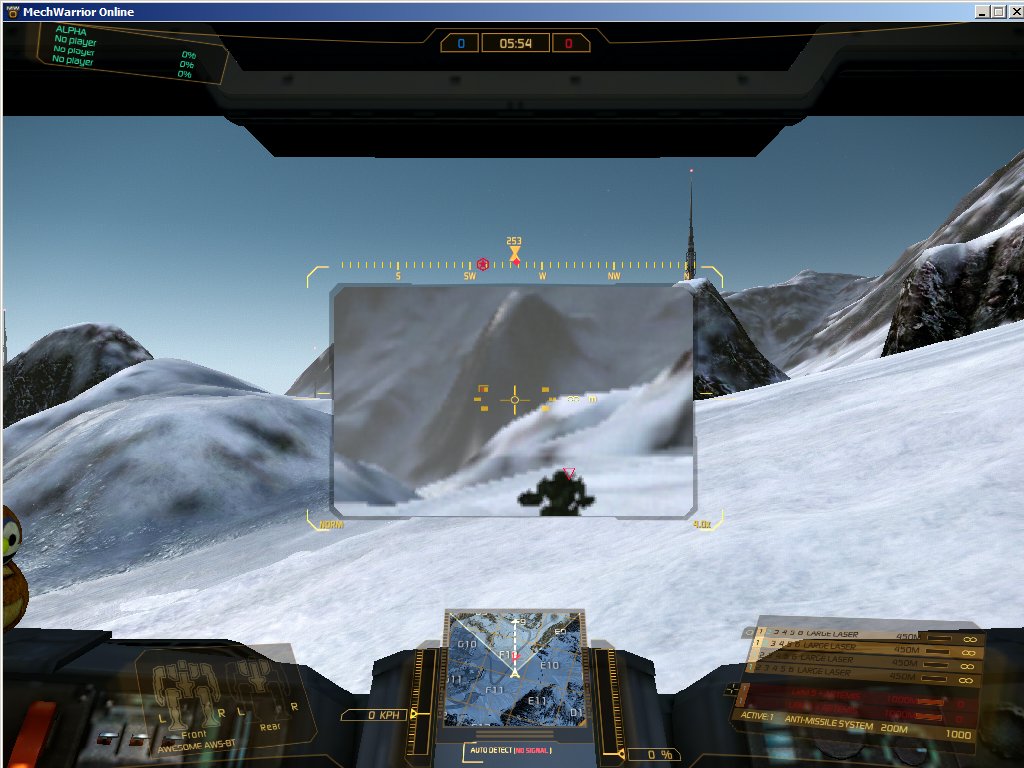
For those who have not noticed, when starting a match your normal view is marked 1.0x near the bottom right yellow ‘corner’ in your HUD. This number changes when you Zoom in.
First Zoom becomes 1.5x, second is 3.0x and Advanced Zoom is marked 4.0x though the part not in the pop up window is at 1.0x.
I took screenshots of the various Zoom steps then shrunk them down and overlaid Zoom images on top of normal view in a Paint program to see where they fit, I followed this by marking in different colors the boundaries of where each Zoom step was in 1.0x normal view. Here is the final image.
Spoiler

In this picture, the Green rectangle marks the outline what you see when you are at 1.5x Zoom.
The Cyan/Light Blue rectangle is the border of 3.0x Zoom.
The Brown rectangle is what appears in the pop up window when using 4.0x Advanced Zoom.
So what is the Purple rectangle? Well, between that and the Brown one is everything you cannot see when using 4.0x Advanced Zoom thus creating a Blind Spot and preventing the image in your view from being seamless. The loss of that area is what messes things up for me, I don’t get physically ill, it just makes it hard to use having that Blind Spot. It is even harder because while the image in the pop up window is 4.0x Zoomed, the image around it is at 1.0x.
I suggest the following change for the Advanced Zoom Module (I figure the game engine can do this):
Currently when hitting the Zoom key,
You start at 1.0x view,
Hit Zoom the first time moves you to 1.5x,
Hit Zoom the second time moves you to 3.0x,
Hit Zoom the third time moves you back to 1.0x.
When the Advanced Zoom Module is installed:
You start at 1.0x view,
Hit Zoom the first time moves you to 1.5x,
Hit Zoom the second time moves you to 3.0x,
Hit Zoom the third time moves you to 4.0x. (change from having the module installed)
Hit Zoom the fourth time moves you back to 1.0x.
Further, 4.0x view should include everything within the Purple rectangle so you have a seamless view thus easier to use, should also have a better picture quality.