Jump to content

The Zoom Blind Spot - 2Nd Problem With Advanced Zoom


19 replies to this topic

Poll: The Zoom Blind Spot - 2Nd Problem With Advanced Zoom (20 member(s) have cast votes)

Do You Agree With the Suggested Advanced Zoom Change?

  1. Yes (18 votes [90.00%])

    Percentage of vote: 90.00%

  2. No (2 votes [10.00%])

    Percentage of vote: 10.00%

  3. Abstain (0 votes [0.00%])

    Percentage of vote: 0.00%

Vote Guests cannot vote

#1 Wildstreak

    Member

  • PipPipPipPipPipPipPipPipPipPip
  • Civil Servant
  • Civil Servant
  • 5,154 posts

Posted 06 May 2013 - 04:18 PM

People know of the picture quality in the small window opened when using Advanced Zoom. But I have another problem with it, that being the lack of seamless view because of how the small window affects what I am looking at. I will illustrate with pictures.

It is pretty obvious part of this picture is missing when using Advanced Zoom as seen in this, can’t find the Commando’s lower half anywhere and terrain does not line up.
Spoiler
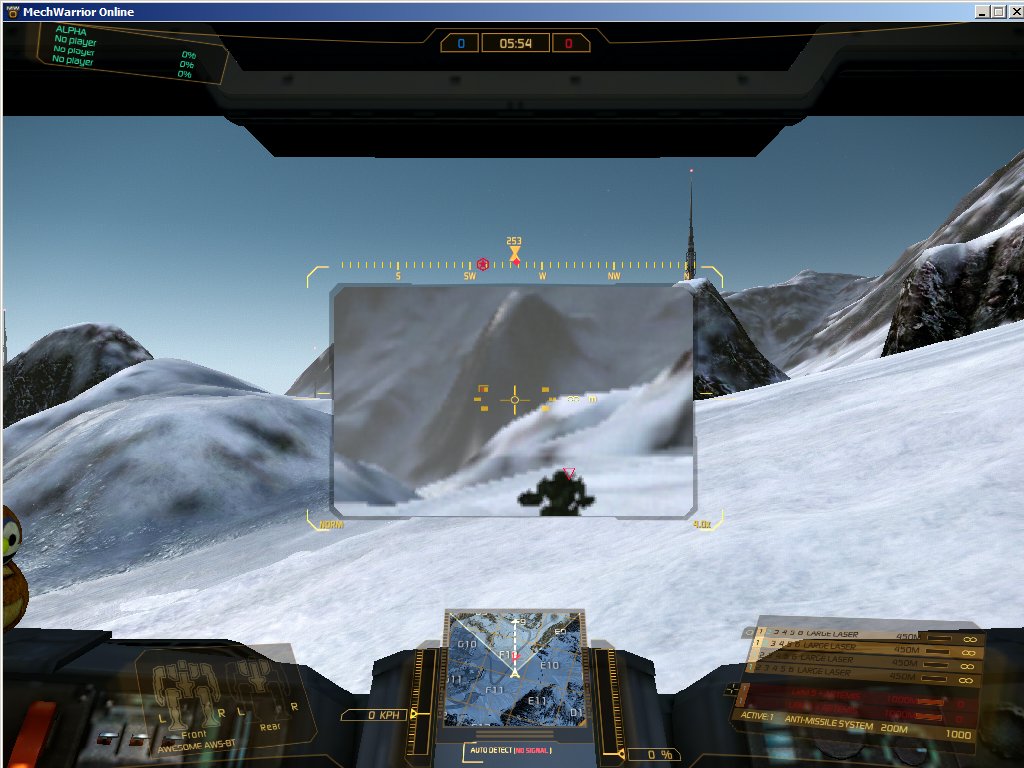

For those who have not noticed, when starting a match your normal view is marked 1.0x near the bottom right yellow ‘corner’ in your HUD. This number changes when you Zoom in.
First Zoom becomes 1.5x, second is 3.0x and Advanced Zoom is marked 4.0x though the part not in the pop up window is at 1.0x.

I took screenshots of the various Zoom steps then shrunk them down and overlaid Zoom images on top of normal view in a Paint program to see where they fit, I followed this by marking in different colors the boundaries of where each Zoom step was in 1.0x normal view. Here is the final image.
Spoiler


In this picture, the Green rectangle marks the outline what you see when you are at 1.5x Zoom.
The Cyan/Light Blue rectangle is the border of 3.0x Zoom.
The Brown rectangle is what appears in the pop up window when using 4.0x Advanced Zoom.

So what is the Purple rectangle? Well, between that and the Brown one is everything you cannot see when using 4.0x Advanced Zoom thus creating a Blind Spot and preventing the image in your view from being seamless. The loss of that area is what messes things up for me, I don’t get physically ill, it just makes it hard to use having that Blind Spot. It is even harder because while the image in the pop up window is 4.0x Zoomed, the image around it is at 1.0x.

I suggest the following change for the Advanced Zoom Module (I figure the game engine can do this):
Currently when hitting the Zoom key,
You start at 1.0x view,
Hit Zoom the first time moves you to 1.5x,
Hit Zoom the second time moves you to 3.0x,
Hit Zoom the third time moves you back to 1.0x.

When the Advanced Zoom Module is installed:
You start at 1.0x view,
Hit Zoom the first time moves you to 1.5x,
Hit Zoom the second time moves you to 3.0x,
Hit Zoom the third time moves you to 4.0x. (change from having the module installed)
Hit Zoom the fourth time moves you back to 1.0x.

Further, 4.0x view should include everything within the Purple rectangle so you have a seamless view thus easier to use, should also have a better picture quality.

#2 Hellcat420

    Member

  • PipPipPipPipPipPipPipPip
  • Bad Company
  • 1,520 posts

Posted 06 May 2013 - 04:34 PM

the thing i always wondered about the advanced zoom was why they dediced to use a tv camera from the 1970's

#3 Monky

    Member

  • PipPipPipPipPipPipPipPipPip
  • Shredder
  • Shredder
  • 3,219 posts
  • LocationHypothetical Warrior

Posted 06 May 2013 - 05:00 PM

For right now, until they fix the picture in picture (which would really be the CryEngine team fixing it as it's a problem with the engine), it should just be 4x zoom with normal picture. It is pretty worthless as it is, which is 5000 gxp down the drain. New players don't forget stuff like that.

#4 Ryokens leap

    Member

  • PipPipPipPipPipPipPipPip
  • Ace Of Spades
  • Ace Of Spades
  • 1,180 posts
  • LocationEdmonton, Alberta, Canada

Posted 06 May 2013 - 05:08 PM

I clicked the sell button on my adv zoom and it dc'ed me to desktop. No refunds or exchanges apparently.

#5 Wolf Ender

    Member

  • PipPipPipPipPipPip
  • 495 posts
  • Google+: Link
  • LocationSacramento, California

Posted 06 May 2013 - 05:12 PM

i agree 100% with OP's proposal

#6 Krazy Kat

    Member

  • PipPipPipPipPipPipPip
  • 696 posts
  • LocationTexas

Posted 06 May 2013 - 05:24 PM

I have thought this myself. Just trash the PIP and do it like OP suggests. Or just skip 3x if you have the module and go to 4x.

#7 Tennex

    Member

  • PipPipPipPipPipPipPipPipPipPip
  • The 1 Percent
  • The 1 Percent
  • 6,619 posts

Posted 06 May 2013 - 05:34 PM

they said they wern't going to do widow in window zoom. because that would significantly drop FPS. because things have to be rendered twice.

so why don't they just fix 4x zoom. to just be 4x zoom instead of having useless blur zoombox.

#8 General Taskeen

    Member

  • PipPipPipPipPipPipPipPipPipPip
  • 5,737 posts
  • LocationCircinus

Posted 09 May 2013 - 05:05 AM

The only proper PIP zoom is the one from Mech Warrior 3. Anything else is meh.

And the claim from the Devs that it "can't be done" is probably more like "that would take too much time." Even if the engine doesn't fully support it, it can still be engineered when having access to engine code. If 10 year old games on really old engines could do it, then its not impossible on today's engines.

Edited by General Taskeen, 09 May 2013 - 05:28 AM.


#9 Corvus Antaka

    Member

  • PipPipPipPipPipPipPipPipPipPip
  • Knight Errant
  • Knight Errant
  • 8,310 posts
  • Twitch: Link
  • LocationInner Sphere

Posted 09 May 2013 - 05:11 AM

View PostMonky, on 06 May 2013 - 05:00 PM, said:

For right now, until they fix the picture in picture (which would really be the CryEngine team fixing it as it's a problem with the engine), it should just be 4x zoom with normal picture. It is pretty worthless as it is, which is 5000 gxp down the drain. New players don't forget stuff like that.


This. with module, give the second zoom level of current more zoom.

#10 Blue Footed Booby

    Member

  • PipPipPipPipPipPip
  • 393 posts
  • LocationHere?

Posted 09 May 2013 - 05:49 AM

View PostHellcat420, on 06 May 2013 - 04:34 PM, said:

the thing i always wondered about the advanced zoom was why they dediced to use a tv camera from the 1970's


It's because the advanced zoom is literally just an enlarged copy of the center portion of your screen.

In games, rendering a reflection or an actual zoomed in view involves rendering the entire game again. This basically doubles object and polygon count and exactly doubles the number of shader passes, regardless of how big the zoomed in window is. It's a tremendous amount of overhead, especially on top of fancy-pants deferred rendering techniques and dynamic shadows. This is why most games just zoom in the view and slap on a circular cut-out.

What I'd do if I were PGI is render the zoomed portion at full quality, but render the main view at decreased resolution and with lower-poly level of detail models and smaller mipmaps and so forth. Then the non-zoomed view would have a gaussian blur so you can't tell how much the quality has decreased. This way you keep situational awareness while getting a nice, non-pixelated zoom.

Edited by Blue Footed Booby, 09 May 2013 - 06:02 AM.


#11 Vassago Rain

    Member

  • PipPipPipPipPipPipPipPipPipPipPip
  • Bridesmaid
  • Bridesmaid
  • 14,396 posts
  • LocationExodus fleet, HMS Kong Circumflex accent

Posted 09 May 2013 - 06:35 AM

View PostMonky, on 06 May 2013 - 05:00 PM, said:

For right now, until they fix the picture in picture (which would really be the CryEngine team fixing it as it's a problem with the engine), it should just be 4x zoom with normal picture. It is pretty worthless as it is, which is 5000 gxp down the drain. New players don't forget stuff like that.


I'm not an an engineer, but if you look at the scopes in the following screenshots...


Posted Image

Posted Image

Posted Image

Posted Image

Posted Image

...that kinda looks like a picture in picture to me. Maybe it's not.

#12 Monky

    Member

  • PipPipPipPipPipPipPipPipPip
  • Shredder
  • Shredder
  • 3,219 posts
  • LocationHypothetical Warrior

Posted 09 May 2013 - 10:28 AM

Very interesting, I'm going off of what the Dev team has said in the past about re-rendering.

My guess here (and it is purely a guess) is that what you're seeing isn't a re-render, but a feed of the existing screen at the same resolution (which is basically what the current PIP 4x zoom uses, which makes it grainy and blocky and generally useless when magnified 4x and stretched over a good sized portion of the screen). They can get away with this because it's a small section of screen real estate and the quality drop isn't very noticeable at that size in those screenshots.

Edited by Monky, 09 May 2013 - 10:31 AM.


#13 aeimage

    Rookie

  • 1 posts

Posted 21 May 2013 - 12:51 AM

advanced image zoom .net is getting my vote, another level of zooming with one click.

#14 Schweinebucht

    Rookie

  • 1 posts

Posted 09 June 2013 - 08:36 AM

View PostMonky, on 06 May 2013 - 05:00 PM, said:

New players don't forget stuff like that.


You bet! I was like "Finally I can bring on these ER PPC and AC2's on my FB more accurate" and what do I get? A view that feels like a DOSGame in 320x200. Thank you very much for the waste of GXP that could have been spent more wisely. And NO I do not have to look up every aspect of the game before I play. That is what Tutorials are for...err...oh...nevermind...

#15 HiplyRustic

    Member

  • PipPipPipPipPipPip
  • 390 posts

Posted 09 June 2013 - 09:03 AM

View PostMonky, on 09 May 2013 - 10:28 AM, said:

Very interesting, I'm going off of what the Dev team has said in the past about re-rendering.

My guess here (and it is purely a guess) is that what you're seeing isn't a re-render, but a feed of the existing screen at the same resolution (which is basically what the current PIP 4x zoom uses, which makes it grainy and blocky and generally useless when magnified 4x and stretched over a good sized portion of the screen). They can get away with this because it's a small section of screen real estate and the quality drop isn't very noticeable at that size in those screenshots.


Check this:

Posted Image

It's clearly do-able. It's probably not performance-cheap but by lo-res rendering things outside the zoom area you can cut that cost.

#16 icervoid

    Member

  • PipPip
  • Legendary Founder
  • 20 posts

Posted 29 June 2013 - 02:26 PM

i agree with

but according to this is a another problem : CUSTOMIZATION

-not all people want to use all zoom levels: so create boxes for each of them to enable / disable by will
-one or many want to custom EACH zoom sensitivity: so create sliders for everyone of them


and if i buy a sniper rifle with a advanced zoom like that one from MWO then i call myself a ODDBALL

Edited by icervoid, 29 June 2013 - 02:32 PM.


#17 Dr B00t

    Member

  • PipPipPipPipPipPip
  • Survivor
  • 496 posts

Posted 29 June 2013 - 02:32 PM

i would actually prefer just a toggle for full screen 4x

#18 Oppresor

    Member

  • PipPipPipPipPipPipPip
  • 997 posts
  • LocationPortsmouth, England

Posted 29 June 2013 - 02:56 PM

My biggest problem with Advanced Zoom is the way that LRM lock indicators bounce around, giving a false impression of where the target is. The image quality is to be kind "Not good", especially having given up 5000 hard earned GXP to get it.

#19 Sephlock

    Member

  • PipPipPipPipPipPipPipPipPipPipPip
  • Legendary Founder
  • Legendary Founder
  • 10,820 posts

Posted 29 June 2013 - 03:20 PM

View PostOppresor, on 29 June 2013 - 02:56 PM, said:

My biggest problem with Advanced Zoom is the way that LRM lock indicators bounce around, giving a false impression of where the target is. The image quality is to be kind "Not good", especially having given up 5000 hard earned GXP to get it.

Yeah the combination of low image quality and jumping targeting box can lead to friendly fire when you are squinting at a distant grey blob circling another grey blob, each coming in and out of view on uneven grey terrain.

View PostHiplyRustic, on 09 June 2013 - 09:03 AM, said:

It's clearly do-able. It's probably not performance-cheap but by lo-res rendering things outside the zoom area you can cut that cost.

Yeah that's brilliant actually.

#20 Mudhutwarrior

    Member

  • PipPipPipPipPipPipPipPipPip
  • The 1 Percent
  • The 1 Percent
  • 4,183 posts
  • LocationThe perimieter, out here there are no stars.

Posted 29 June 2013 - 04:27 PM

View PostOppresor, on 29 June 2013 - 02:56 PM, said:

My biggest problem with Advanced Zoom is the way that LRM lock indicators bounce around, giving a false impression of where the target is. The image quality is to be kind "Not good", especially having given up 5000 hard earned GXP to get it.


Agreed, its just bad all over. I own one for each mechs but dont use them.


1 user(s) are reading this topic

0 members, 1 guests, 0 anonymous users