
With all the 'garbage' noises that continue to be added to the game ("War horns", certain 'mechs jamming out tunes after a kill), and the changes to other sounds, please, Please, PLEASE provide either a louder gauss charging noise, OR, provide an option to allow individual users to increase it.
There's been little to no progress in addressing color blindness issues with the targeting reticule and the "ready" indicator lights that surround it, in a lot of situations I'm clueless to the actual status of the charge, unless I'm willing to risk taking my eyes off the target check the status in the lower right hand corner of the screen, of course potentially losing some of my .75 second firing window available.
So to address the inherent unfairness of allowing insta-fire lasers, ppc's and ballistic (that in many cases now far outstrip the damage of gauss, and easily approach the same range) and all the extra, unwanted and unasked for sound affects, as well as the long standing suffering of your colorblind players, PLEASE add some volume, or some additional user config options.
 2
2

Please For The Love Of Kerenksy, Provide An Option To Increase The Gauss Charging Noise
Started by Dimento Graven, Jul 07 2014 09:56 AM
Feedback
13 replies to this topic
#2
-

-

- Bad Company
- 2,461 posts
Member
- LocationEvening Ladies
Posted 07 July 2014 - 09:58 AM
Id prefer the charge bar was up near my crosshairs personaly.
#3
Posted 07 July 2014 - 10:02 AM
 Xeno Phalcon, on 07 July 2014 - 09:58 AM, said:
Id prefer the charge bar was up near my crosshairs personaly.
My primary tell is the sound, if I hear it to start charging I'll try and time my shot appropriately.
This may become more of an issue once (or if ever) VOIP is integrated into the game, depending on how it's integrated and what level of volume control you'll give the players (in Team Speak it's possible to increase and decrease the volume level of specific players, as well as the entire channel if needed).
#4
-
-
- The 1 Percent

- 3,108 posts
Member
Posted 07 July 2014 - 11:08 AM
i wouldnt mind an increase to the noises for all weapons when they are ready to fire again.
#5
-
-
- FP Veteran - Beta 1

- 2,909 posts
Member
Posted 07 July 2014 - 03:04 PM
Do you use headphones or speakers?
I ask because I use headphones, Turtlebeach X12s, and I can hear the charge up sound for gauss just fine, over all the noises of the game, voicecomms and a noisy household. I can hear the chirp of enemy getting a sensor lock on me, rounds impacting near my location, even Mechs walking 50m away in some locations.
I ask because I use headphones, Turtlebeach X12s, and I can hear the charge up sound for gauss just fine, over all the noises of the game, voicecomms and a noisy household. I can hear the chirp of enemy getting a sensor lock on me, rounds impacting near my location, even Mechs walking 50m away in some locations.
#6
Posted 07 July 2014 - 03:12 PM
Kristov Kerensky, on 07 July 2014 - 03:04 PM, said:
Do you use headphones or speakers?
I ask because I use headphones, Turtlebeach X12s, and I can hear the charge up sound for gauss just fine, over all the noises of the game, voicecomms and a noisy household. I can hear the chirp of enemy getting a sensor lock on me, rounds impacting near my location, even Mechs walking 50m away in some locations.
I ask because I use headphones, Turtlebeach X12s, and I can hear the charge up sound for gauss just fine, over all the noises of the game, voicecomms and a noisy household. I can hear the chirp of enemy getting a sensor lock on me, rounds impacting near my location, even Mechs walking 50m away in some locations.
Perhaps it's my age, and/or the years and Years and YEARS of abusing my ears with loud music, BUT, I can't "always" hear that gauss noise, especially when surrounded by 11 other 'mechs firing, blaring warhorns, or guitar music, and/or receiving incoming fire, and/or TeamSpeak chatter when I'm dropping with my team.
So... Let's assume that in the few thousand years of 'mech warfare some 'tech figured out a means of amplifying the gauss loading noise, please.
Edited by Dimento Graven, 07 July 2014 - 03:12 PM.
#7
-

-
- Bad Company

- 161 posts
Member
Posted 08 July 2014 - 02:49 PM
I wear nice headphone but I hardly ever hear the gauss charge up. I have taken to running an ac2 with the gause just because I can time the cadence of the ac2 shots for when the gauss is ready again. As for a tone indicating the enemy has a lock on me, I didn't even know that was a thing.
#8
Posted 08 July 2014 - 03:05 PM
Valten, on 08 July 2014 - 02:49 PM, said:
I wear nice headphone but I hardly ever hear the gauss charge up. I have taken to running an ac2 with the gause just because I can time the cadence of the ac2 shots for when the gauss is ready again. As for a tone indicating the enemy has a lock on me, I didn't even know that was a thing.
#9
-

-
- The Wolf

- 1,323 posts
Member
- LocationÅrhus, Denmark

Posted 08 July 2014 - 03:28 PM
I would really like a progress bar near the crosshair so that I can see EXACTLY when it's ready and when it's overcharged. Even when you can hear the sounds, it's a dodgy indication at best.
#10
-
-
- FP Veteran - Beta 1
- 2,909 posts
Member
Posted 12 July 2014 - 07:38 AM
Valten, Dimento, there is a high pitched noise whenever an enemy gets a sensor lock on you, meaning they hit R and pull you up as a target. It's hard to descibe the sound, kind of a 'wheeeep' type noise, first times I heard it I thought something was going out in my headphones until I realized I was hearing it right before getting sniped at or getting an incoming missile warning.
I've always been very particular about the headphones or speakers and sound system I use, so many of the games I've played had audio cues that were extremely useful if not vital to doing well. Being able to hear someone walking on the other side of a wall or rock or whatever in Tribes or Battlefield titles, where a shot came from or was going, the thump of a grenade landing somewhere nearby...love that and it's saved my arse so many times in so many games. MWO has lots of audio cues that people don't realize are there, usually because they have their own or the ingame music playing, or they are using speakers or less than excellent headphones..or they just don't listen.
I've always been very particular about the headphones or speakers and sound system I use, so many of the games I've played had audio cues that were extremely useful if not vital to doing well. Being able to hear someone walking on the other side of a wall or rock or whatever in Tribes or Battlefield titles, where a shot came from or was going, the thump of a grenade landing somewhere nearby...love that and it's saved my arse so many times in so many games. MWO has lots of audio cues that people don't realize are there, usually because they have their own or the ingame music playing, or they are using speakers or less than excellent headphones..or they just don't listen.


#12
-

-
- The Seeker

- 8,739 posts
Member
- LocationSeraphim HQ: Asuncion

Posted 12 July 2014 - 08:32 AM
Xeno Phalcon, on 07 July 2014 - 09:58 AM, said:
Id prefer the charge bar was up near my crosshairs personaly.
I'm no expert, but I do believe there is actually a charge indicator near the reticule. I just closed my game and about to leave the house, so I can't quickly confirm, but try it out.
Go to Testing Grounds with a Gauss equipped mech. Look at the six yellow (or is it green, can't remember) boxes around your reticule. Each of those boxes represents a weapon group. When you shoot a respective group, I believe the box turns red till the weapons in that group can fire again.
With a Gauss, I believe the box turns color to show it is ready to shoot (like other weapons) and then turns another color when you start to charge it. Once the Gauss is fully charged and ready to fire, that box should change color again. (I believe it goes from ready color, to a box that fills up with another color for the charge. Once it's fully charged, I believe the box will be fully whatever the "charging" color was, indicating it is ready to fire.)
If no one else confirms this before I get back later tonight (a long while), I'll see about posting some screen shots/confirming this.
#13
-
-
- The Seeker
- 8,739 posts
Member
- LocationSeraphim HQ: Asuncion
Posted 12 July 2014 - 09:16 AM
There is a charge visual near the reticule. Might not always be obvious in combat, but it is there.
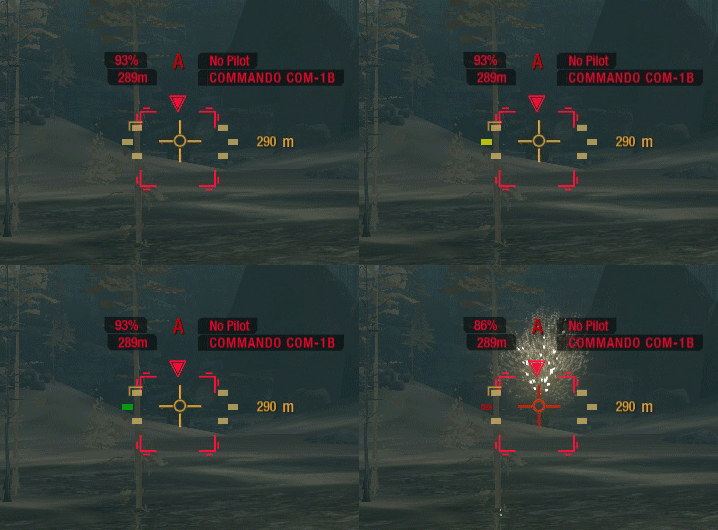
It goes from a pale yellow, to a very quick bright yellow, then to a green to indicate charge, and then red when you have discharged your weapon. (The quick blip in the yellow in the Giff is about the timing that it shows up for. Maybe a little longer.)
It goes from a pale yellow, to a very quick bright yellow, then to a green to indicate charge, and then red when you have discharged your weapon. (The quick blip in the yellow in the Giff is about the timing that it shows up for. Maybe a little longer.)
#14
-
-
- The Wolf
- 1,323 posts
Member
- LocationÅrhus, Denmark
Posted 12 July 2014 - 09:17 AM
There are small indicators near the reticule which normally are there to show if a target is in optimal range (green), non-optimal, but within range (yellow) or out of range (grey). And yes, when using a weapon group with Gauss in it, the indicater becomes yellow while charging and green when charged and then grey when losing the charge again.
This certainly helps, but I often find then rather small and thus I need to focus a lot to see it and then I'm not focusing on what I'm shooting at. Also, I would really prefer to see a progress bar instead so I know if it is fully charged in just a milli second or if still needs a second. Would be appriciated when needing to twitch shoot enemies.
This certainly helps, but I often find then rather small and thus I need to focus a lot to see it and then I'm not focusing on what I'm shooting at. Also, I would really prefer to see a progress bar instead so I know if it is fully charged in just a milli second or if still needs a second. Would be appriciated when needing to twitch shoot enemies.


1 user(s) are reading this topic
0 members, 1 guests, 0 anonymous users


