
Howdy folks. Getting a new PC for christmas and I have a question. Where (i.e. what file) are the keybindings located in? For example, if I have the "w" key reset to fire all weapons rather than move forward (I don't have it mapped that way, but it's an example).
A google search said it was located in a file called user.cfg, but I'll be darned if I can locate that file anywhere. All I want to be able to do is transfer my settings to the new computer easily. My plan was to to copy that file and paste it in after the new reinstall of MWO on the new PC.
Any help would be appreciated.
 0
0

6 replies to this topic
#1
-
-

- Hero of Steiner

- 841 posts
Member
- LocationYou gotta lose your mind in Detroit! Rock City!
Posted 26 December 2020 - 10:11 AM
#2
-

-
- Ace Of Spades

- 8,900 posts
Member

Posted 26 December 2020 - 10:35 AM
 Khalcruth, on 26 December 2020 - 10:11 AM, said:
Howdy folks. Getting a new PC for christmas and I have a question. Where (i.e. what file) are the keybindings located in? For example, if I have the "w" key reset to fire all weapons rather than move forward (I don't have it mapped that way, but it's an example).
A google search said it was located in a file called user.cfg, but I'll be darned if I can locate that file anywhere. All I want to be able to do is transfer my settings to the new computer easily. My plan was to to copy that file and paste it in after the new reinstall of MWO on the new PC.
Any help would be appreciated.
A google search said it was located in a file called user.cfg, but I'll be darned if I can locate that file anywhere. All I want to be able to do is transfer my settings to the new computer easily. My plan was to to copy that file and paste it in after the new reinstall of MWO on the new PC.
Any help would be appreciated.
Try this:
C:\Users\User\Saved Games\MechWarrior Online\Profiles\Khalcruth
It should be there or somewhere near.

Your modified keybindings should be in
actionmaps.xml
Edited by martian, 26 December 2020 - 10:36 AM.
#3
-
-
- Hero of Steiner
- 841 posts
Member
- LocationYou gotta lose your mind in Detroit! Rock City!
Posted 26 December 2020 - 11:25 AM
Thanks, I'll copy that whole directory.
Any idea which one of those files would also have things like the mouse sensitivity settings?
Any idea which one of those files would also have things like the mouse sensitivity settings?
#4
-
-
- Ace Of Spades
- 8,900 posts
Member
Posted 26 December 2020 - 12:14 PM
Khalcruth, on 26 December 2020 - 11:25 AM, said:
Thanks, I'll copy that whole directory.
Any idea which one of those files would also have things like the mouse sensitivity settings?
Any idea which one of those files would also have things like the mouse sensitivity settings?
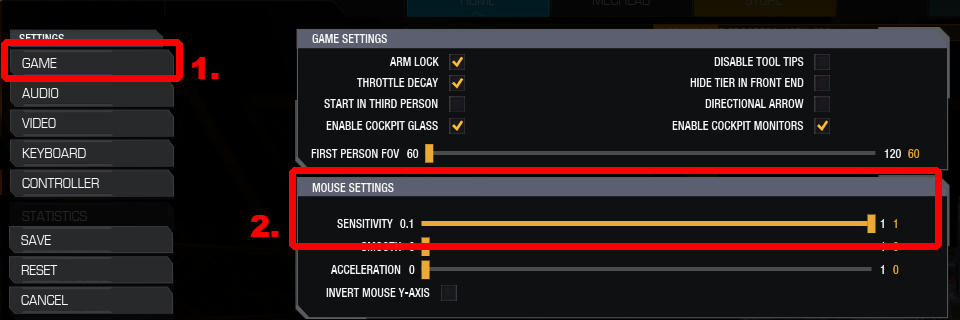
1. Go to the game settings.
2. Use the slider to set your mouse sensitivity.
It's a matter of five seconds.
#5
-
-
- Hero of Steiner
- 841 posts
Member
- LocationYou gotta lose your mind in Detroit! Rock City!
Posted 27 December 2020 - 01:55 AM
Yeah, it is a quick process. To change one setting. But as opposed to writing down on a piece of paper the exact value of every single setting, crazily enough, I had hoped to import them all intact.
#6
-
-
- Ace Of Spades
- 8,900 posts
Member
Posted 27 December 2020 - 03:29 AM
Khalcruth, on 27 December 2020 - 01:55 AM, said:
Yeah, it is a quick process. To change one setting. But as opposed to writing down on a piece of paper the exact value of every single setting, crazily enough, I had hoped to import them all intact.
Settings such as the mouse sensitivity are in the
attributes.xml
Simply copy that directory with your profile from your old computer to your new computer.
#7
-

-
- The Mercenary
- 4,750 posts
Member
- LocationPoland
Posted 27 December 2020 - 09:04 AM
You'll want to copy the entire mechwarrior directory from Saved Games. It also includes your weapon groups and mech thumbnails.


2 user(s) are reading this topic
0 members, 2 guests, 0 anonymous users


