Jump to content

Memory Allocation at #### failed!


39 replies to this topic

#21 Kaijin

    Member

  • PipPipPipPipPipPipPipPipPip
  • 2,137 posts

Posted 30 October 2012 - 08:00 PM

View PostRifter, on 30 October 2012 - 02:48 AM, said:

Upgrade to 64 bit, it will solve your issue. Worked for lots of people in the closed beta.


That didn't solve it for me. Increasing RAM from 2 GB to 8GB merely delays the inevitable. What took 4 or 5 matches to occur now takes 20 or so.

#22 MorbidGamer

    Member

  • PipPipPipPipPip
  • 145 posts

Posted 30 October 2012 - 08:04 PM

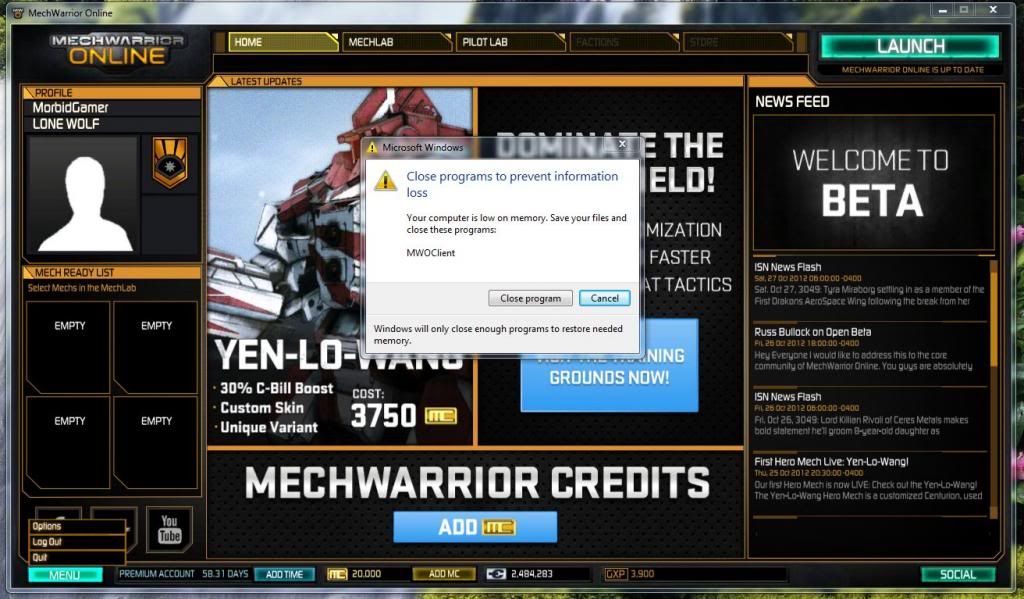
Prob the mem leak eating your memory.

I got 8 GB and it lasts me about an hour and 15 mins of play. That's with pagefile off.

Then I gotta exit the game and re-open it up or it will crash.

#23 Thetin

    Member

  • Pip
  • 10 posts

Posted 30 October 2012 - 08:45 PM

Not sure if this will help at all but I used to have a similar problem and I changed my game setting to full screen and I havent had the problem since then.

#24 leptoon

    Member

  • Pip
  • 10 posts

Posted 30 October 2012 - 11:43 PM

For those of you with memory errors after playing for a period of time, like 5 matches or so, you can prevent that from happening. Just use a program called Memory Cleaner and have it trim your working set every time the usage goes above 80%. It works for me too, but it seems to be trimming all of the textures so all I see is transparent trees and buildings. So I am going to install 64 bit Windows when my new hard drive gets here, hopefully that will solve the problem long enough to use the memory cleaner to clear the leaky memory.

#25 Carl Wrede

    Member

  • PipPipPipPipPipPipPip
  • Legendary Founder
  • Legendary Founder
  • 958 posts
  • LocationStockholm, Sweden

Posted 30 October 2012 - 11:55 PM

View Postleptoon, on 30 October 2012 - 11:43 PM, said:

For those of you with memory errors after playing for a period of time, like 5 matches or so, you can prevent that from happening. Just use a program called Memory Cleaner and have it trim your working set every time the usage goes above 80%. It works for me too, but it seems to be trimming all of the textures so all I see is transparent trees and buildings. So I am going to install 64 bit Windows when my new hard drive gets here, hopefully that will solve the problem long enough to use the memory cleaner to clear the leaky memory.


In the meantime you can restart the game when you get the 4FPS or memory allocation error and you should be able to play again for some time.

Hopefully they will fix this soon.

#26 Kaijin

    Member

  • PipPipPipPipPipPipPipPipPip
  • 2,137 posts

Posted 31 October 2012 - 04:55 AM

View Postleptoon, on 30 October 2012 - 11:43 PM, said:

For those of you with memory errors after playing for a period of time, like 5 matches or so, you can prevent that from happening. Just use a program called Memory Cleaner and have it trim your working set every time the usage goes above 80%. It works for me too, but it seems to be trimming all of the textures so all I see is transparent trees and buildings. So I am going to install 64 bit Windows when my new hard drive gets here, hopefully that will solve the problem long enough to use the memory cleaner to clear the leaky memory.


I recently installed 64bit Windows 7, up from Windows XP 32bit. Shortly after I upgraded RAM fro 2 GB to 8GB. Didn't fix the memory leak for me, but maybe you will be lucky.

#27 wuselfuzz

    Member

  • PipPipPipPipPip
  • 143 posts

Posted 31 October 2012 - 07:22 AM

View PostMinionJoe, on 30 October 2012 - 11:37 AM, said:

A memory allocation error occurs when two programs are trying to use the same memory address. You may have a program loaded (such as anti-virus, desktop widget, etc etc) that requires the same address as part of MWO. Sounds like PGI is aware of it though and they will probably be removing the hard-coded address requirement from their code.

Assuming that's the problem.


Sorry to sound harsh, but your explanation is b.s.. Each process on a modern OS (i.e. everything after Win2k/NT) has its own address space, managed by the processor's MMU.

The game has a memory leak and fails to get (allocate) new memory after it's been running for a while.

The 4 fps + heavy disk activity symptom probably happens when main memory is swapped to disk. Same reason, memory's full.

Edited by wuselfuzz, 31 October 2012 - 07:24 AM.


#28 Mylar

    Member

  • PipPipPipPipPip
  • Bad Company
  • 105 posts

Posted 31 October 2012 - 07:33 AM

Tagging so I can find this thread easier later.

I assumed this was from my using rendering video cards instead of gaming videa cards (Quadro FX4800).
Interesting to see others with the same issue.

I would get the error and crash maybe every hour or two in closed beta. Since open beta began I'm getting it every two or three matches. Sometimes consecutively, my worst streak has been three matches in a row.

#29 MorbidGamer

    Member

  • PipPipPipPipPip
  • 145 posts

Posted 31 October 2012 - 08:51 AM

Mem leak...

Posted Image

64bit 8GB RAM.

#30 BellatorMonk

    Member

  • PipPipPipPipPipPipPip
  • Shredder
  • Shredder
  • 617 posts
  • LocationWallet Closed PGI Knows Why

Posted 31 October 2012 - 09:00 AM

Reinstall..fixes most of this crap everytime. Every patch I have had some type of issue like this and after a full reinstall (delete all previous install files) it works fine.
Apparently the patcher does not error check so the patcher just about always installs something corrupt unless it's a full install.

#31 Carl Wrede

    Member

  • PipPipPipPipPipPipPip
  • Legendary Founder
  • Legendary Founder
  • 958 posts
  • LocationStockholm, Sweden

Posted 31 October 2012 - 05:09 PM

The memory leak has occured several times during closed beta so hopefully they are used to hunting it down by now.

#32 slide

    Member

  • PipPipPipPipPipPipPipPip
  • Legendary Founder
  • Legendary Founder
  • 1,768 posts
  • LocationKersbrook South Australia

Posted 31 October 2012 - 05:24 PM

I get 3 games max on my system, since the cry engine upgrade. Ran perfectly on the old engine but they did have this problem earlier in beta and they seemed to fix it ok. I notice my frame rate drops every game. Use F9 to monitor your fps and when it gets too low (ie 10-12) quit and restart other wise next game is likely to 4fps or crash altogether.

When I submitted a ticket the response I got was that I didn't meet minimums specs (only 3Gb Ram), not much help but, there you go.

#33 Ravensol

    Member

  • PipPipPipPipPipPip
  • 359 posts

Posted 31 October 2012 - 05:54 PM

there are 3 differant crashes i've had the memory leak the cryo engine error and the ?? just shut the heck off with no ryme or reason. before the patch last week the cryo and memory leaks wern't a issue play for a few hours crash play a few more no real issue there i need to remember to get up every now n then anyway. But since last week they came back and monday and tue this week it was back to the point it took me 16 matches played just to see 4 finished matches. It is in there end won't matter what system seem perty random on the plp complaining about it as to what there pc is.

#34 Accused

    Member

  • PipPipPipPipPipPipPip
  • Elite Founder
  • Elite Founder
  • 989 posts

Posted 31 October 2012 - 05:57 PM

This is an old, and very common bug.

You need to do a bcdedit to free up more memory. Not sure if this works with 64bit systems though, although it should work (or at least postpone) 32bit systems crashing/

#35 Radical

    Rookie

  • Philanthropist
  • 7 posts

Posted 02 November 2012 - 04:28 AM

I was having this bug untill I changed the graphics settings from High to Low.
Game runs a little sluggishly, but at least it runs now. :P

#36 Verjigorm

    Rookie

  • 1 posts

Posted 02 November 2012 - 10:49 AM

View PostRadical, on 02 November 2012 - 04:28 AM, said:

I was having this bug untill I changed the graphics settings from High to Low.
Game runs a little sluggishly, but at least it runs now. :(


That's just a workaround for some time...
Such errors simply shouldn't occur.

I installed the game today and in every attempt to enter a second match the client crashes.

I'm running a Core2Duo 6600 (2.40 GHz) with 2 GB RAM... though a bit low (compared to more actual gamer machines) it shouldn't make playing such jarring.

#37 GallowayGearbox

    Rookie

  • 3 posts

Posted 08 November 2012 - 10:43 PM

I used to get this about 95% of the time, either upon entering a map or leaving the battle. Following the advice of another thread, I simply unplugged my USB joystick (MS Sidewinder) and the game seems stable for now. We'll see how it holds together as I test some more.

#38 AkalaOubli

    Member

  • PipPip
  • 28 posts

Posted 14 December 2012 - 07:59 PM

For those of you ranting about upgrading to 64 bit you are aware that means a full wipe of EVERYTHING and a fresh install right? you can't change the bitness once it's there without nuking it from orbit.

#39 xenoglyph

    Member

  • PipPipPipPipPipPipPipPip
  • 1,480 posts
  • LocationSan Diego

Posted 14 December 2012 - 08:49 PM

Nobody was ranting about it and you just bumped a 5 week old thread to say that. 5 years ago 64 bit windows had pretty terrible driver support and so it was wise to avoid it if possible. These days it's pretty much mandatory that you run a 64 bit OS to get the most out of your system. What's the big deal?

#40 1psa1

    Rookie

  • FP Veteran - Beta 1
  • 3 posts

Posted 03 April 2013 - 12:58 PM

was same error (memory alloc). cleared with "/NoExecute=AlwaysOff" key on boot.ini in my WinXP SP3


1 user(s) are reading this topic

0 members, 1 guests, 0 anonymous users