

title said it,
missing mechwarrior entry in start menu.
win7 ultimate 64bit
 2
2

Missing Mechwarrior Entry In The Startmenu
Started by Acid Phreak, Dec 19 2012 07:24 AM
14 replies to this topic
#2
-

-

- Legendary Founder

- 427 posts
Member
Posted 19 December 2012 - 07:29 AM
Not sure what you mean by "entry." Are you referring to the login screen? If so, could you provide a screenshot of what you are seeing? That will help the Devs figure out what is wrong with the client.
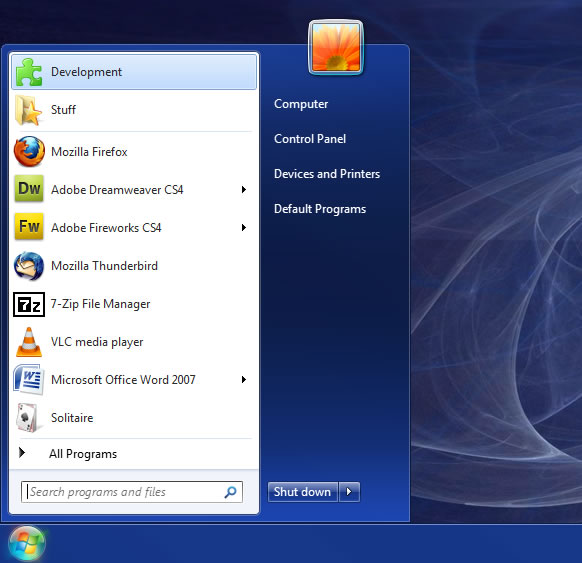
#4
-

-
- 689 posts
Member

Posted 19 December 2012 - 07:35 AM
never placed one as far as I remember. not even under the admin account.
#6
-
-
- Overlord

- 1,627 posts
Member
- Location/dev/null

Posted 19 December 2012 - 07:37 AM
You can put it there yourself however if that is where you want it.
The game icon will be in its own group under All Programs.
Once you find it, just right click the icon and select "pin to start menu".
The game icon will be in its own group under All Programs.
Once you find it, just right click the icon and select "pin to start menu".
#8
-
-
- Overlord
- 1,627 posts
Member
- Location/dev/null
Posted 19 December 2012 - 07:54 AM
Fair enough.
Then open My Computer and look at your C: drive.
If you installed the game in the default folder, there should be a Games folder right off the root.
Open that and look for the MWO executable. Double click it. Once you run it manually for the first time, it should place the icon on your start menu for you.
I'm not in front of my gaming pc right now, or I'd tell the exact path to the executable.
Then open My Computer and look at your C: drive.
If you installed the game in the default folder, there should be a Games folder right off the root.
Open that and look for the MWO executable. Double click it. Once you run it manually for the first time, it should place the icon on your start menu for you.
I'm not in front of my gaming pc right now, or I'd tell the exact path to the executable.
#10
-
-
- 689 posts
Member
Posted 19 December 2012 - 07:57 AM
 Acid Phreak, on 19 December 2012 - 07:55 AM, said:
i know how to stuffs on windows 
You sure do, you even have a Stuff folder in your start menu after all. SCNR.
#12
-

-
- The Nimble

- 5,136 posts
Member
- LocationPlymouth, MN
Posted 19 December 2012 - 08:00 AM
Acid Phreak, on 19 December 2012 - 07:55 AM, said:
thanks for your help,
but that is not what i looking for, i know how to stuffs on windows
but that is not what i looking for, i know how to stuffs on windows
No you don't or you would have just put it into the Start menu instead of coming to a forum to say it isn't.
#13
Posted 19 December 2012 - 08:04 AM
well i can do it myself yes but that is not the case here.
it should already there after a installation, because if i run another account on my windows i just missing everything from mwo and if the account a guest account then i cant go in the installed folder to start the game except i lower the securtity or put it in with an admin account. ...
it should already there after a installation, because if i run another account on my windows i just missing everything from mwo and if the account a guest account then i cant go in the installed folder to start the game except i lower the securtity or put it in with an admin account. ...
Edited by Acid Phreak, 19 December 2012 - 08:06 AM.
#14
-
-
- Legendary Founder
- 427 posts
Member
Posted 19 December 2012 - 08:06 AM
Mercules, on 19 December 2012 - 08:00 AM, said:
No you don't or you would have just put it into the Start menu instead of coming to a forum to say it isn't.
Actually, he has a valid concern. If the program deletes the folder from the start menu when it patches and doesn't replace it with a new one, then it is information that the Devs should have. It indicates a problem with the patcher.
#15
-
-
- 689 posts
Member
Posted 19 December 2012 - 08:07 AM
JediMastaDJ, on 19 December 2012 - 08:06 AM, said:
Actually, he has a valid concern. If the program deletes the folder from the start menu when it patches and doesn't replace it with a new one, then it is information that the Devs should have. It indicates a problem with the patcher.
Don't mind him, he's been arguing earlier that if non-NA players want a regional server they must pay for it. He's the troll under the bridge.


1 user(s) are reading this topic
0 members, 1 guests, 0 anonymous users


