

Hows the Patcher working? Any major difficulties? Please let us know!
- Transition to .NET 4.0 (XP users can download and install .NET 4.0 here)
- The Repair Tool can be used to resolve most issues with installation or patching.
For those having issues with the installer, please contact us at support@mwomercs.com for additional assistance.
 3
3

Patcher / Installer Feedback - 1.2.249
Started by Kyle Polulak, Oct 15 2013 10:49 AM
12 replies to this topic
#2
-
-

- Littlest Helper

- 4,914 posts
Member
Posted 15 October 2013 - 12:14 PM
I think there is something wrong with your loader/patcher that is working the hell out of my harddrive. I'm not an expert so I'm not exactly sure what's going on. My CPU is fine at around 4-10%, I have 8 gigs of ram, which is working fine. I have several hundred gigs of hardrive space, so that isn't the issue. However, whenever I click on anything while patching there is a massive delay, but again it's not a CPU issue.
The only thing I noticed, which I don't know is unsual, is that my disk activity goes off the chart. The Read/Write is way higher than anything else, which I guess is to be expected, but I don't think it should be so extreme that my entire computer is crippled for 15 minutes.
I've noticed this problem for several patches and I've done a fresh install just a few days ago.
The only thing I noticed, which I don't know is unsual, is that my disk activity goes off the chart. The Read/Write is way higher than anything else, which I guess is to be expected, but I don't think it should be so extreme that my entire computer is crippled for 15 minutes.
I've noticed this problem for several patches and I've done a fresh install just a few days ago.
Edited by Jman5, 15 October 2013 - 12:15 PM.
#3
-

-
- Philanthropist
- 1,047 posts
Member

Posted 15 October 2013 - 12:20 PM
Mmmm, analyse your disk for fragmentation?
I know you did an fresh install a few days ago but if the free space is fragmented too then it may have installed in a fragmented state.
I know you did an fresh install a few days ago but if the free space is fragmented too then it may have installed in a fragmented state.
Edited by Jabilo, 15 October 2013 - 12:20 PM.
#4
-
-
- Littlest Helper
- 4,914 posts
Member
Posted 15 October 2013 - 12:55 PM
 Jabilo, on 15 October 2013 - 12:20 PM, said:
Mmmm, analyse your disk for fragmentation?
I know you did an fresh install a few days ago but if the free space is fragmented too then it may have installed in a fragmented state.
I know you did an fresh install a few days ago but if the free space is fragmented too then it may have installed in a fragmented state.
I'll give it a shot
#5
-

- Bad Company

- 2 posts
Rookie

Posted 15 October 2013 - 02:43 PM
I only have this minor "issue" for a while now. Everytime there are several patches, the progress bar gets stuck on "finalizing patch 1 of x". I get no feedback on the patch status from thereon, therefore I have to constantly check if the patch is completed or not. It takes also forever and I don't know if it is my bad download speed or something else. I think I spent roughly 4 hours on this patch.
#6
-

-

- 867 posts
Technical Director

- LocationVancouver, BC
Posted 15 October 2013 - 03:59 PM
This is essentially an artifact of the way the patcher is designed. It keeps a shadow copy of your original file state up until the last minute and then the final patcher step is to retarget all the files to the new copies. This is to ensure there is a very small window of time that your build could end up corrupt (the patcher can always restore your original state) but it is a copy intensive operation. We are investigating if this can be improved in future.
#7
-

- Ace Of Spades
- 1 posts
Rookie
Posted 15 October 2013 - 07:03 PM
The patcher is downloading files at an EXTREMELY slow speed. The estimated time to download the first patch (448.67 megabytes) is ~3 hours. This is pretty ridiculous considering my connection could pull that much data down in about ~5 minutes at full speed.
Is there an alternative to using the patcher? Is it just massive demand that is ruining your bandwidth?
I get that it is a rather significant patch day, but this is pretty poor performance.
Edit: Missing words
Is there an alternative to using the patcher? Is it just massive demand that is ruining your bandwidth?
I get that it is a rather significant patch day, but this is pretty poor performance.
Edit: Missing words
Edited by PILL, 15 October 2013 - 07:03 PM.
#8
-
-
- 247 posts
Member
- LocationGermany
Posted 15 October 2013 - 11:35 PM
4 MBit/s internet connection with wireless, mid-level laptop, usually ~30 FPS all details maxed out
- for me, patch went down smooth as silk - no issues at all
- no FPS change so far observed (i did not see caustic and river city yet, though)
- once out of maybe 15 a party with 11 only on our side, so looks good to me
- once out of maybe 15 thee was a disconnect, looks good to me as well
- found some new places where my mech got stuck/blocked by rough ground, will try to re-locate the spots and psot
overall, great patch, thx
Al Bert
- for me, patch went down smooth as silk - no issues at all
- no FPS change so far observed (i did not see caustic and river city yet, though)
- once out of maybe 15 a party with 11 only on our side, so looks good to me
- once out of maybe 15 thee was a disconnect, looks good to me as well
- found some new places where my mech got stuck/blocked by rough ground, will try to re-locate the spots and psot
overall, great patch, thx
Al Bert
#9
-
-
- 867 posts
Technical Director
- LocationVancouver, BC
Posted 16 October 2013 - 07:57 AM
PILL: We're investigating with our Content Delivery Network provider the possibilities for pre-seeding the download to ensure it's fully distributed by the time it goes live on patch day. Currently if you are the first to download in your area you may get a very slow download as it is pulled into the local server for your area. Like I say we're continuing to look at how we can improve the patch process.
#10
-
-
- The 1 Percent

- 95 posts
Member
- Location127.0.0.1
Posted 16 October 2013 - 08:49 AM
Never had so many issues before
From this thread :http://mwomercs.com/...feedback-12249/
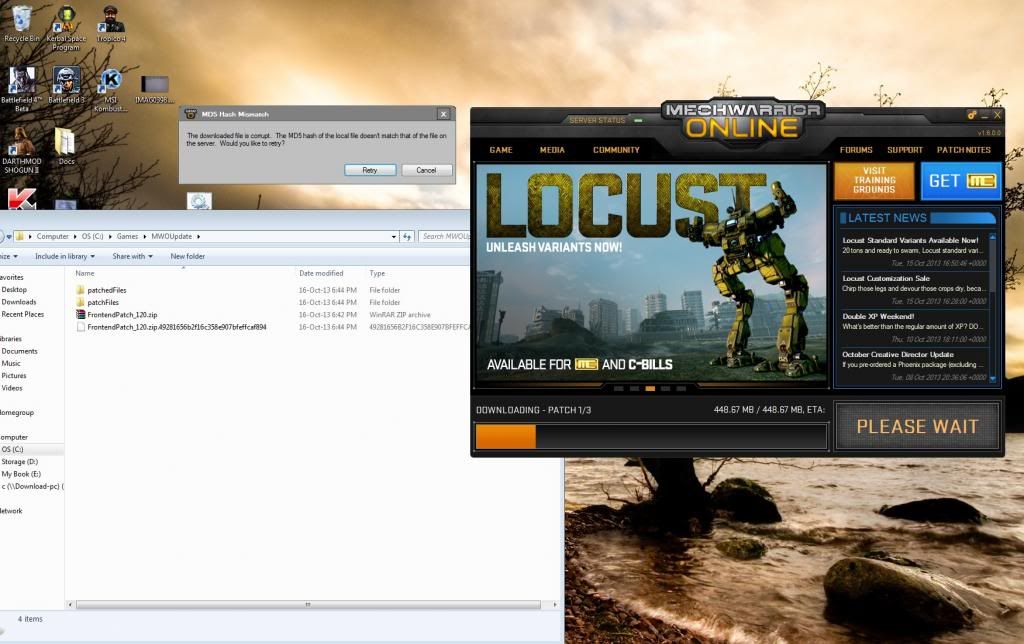
I've tried copying the patch files to another location instead of having to redownload everytime. Now I get this
From this thread :http://mwomercs.com/...feedback-12249/
Kuga ZA, on 16 October 2013 - 05:48 AM, said:
I am having a similar problem.
While updating the new patch, my PC BSOD and restarted. Tried launching MWO, it says play - go through the whole intro video and after logged in, game closes.
I then restored MWO to the previous version (yes I keep backups) and tried patching again. Same thing.
Tried running the repair tool, run as admin, deleted shaders - no dice.
Haven't changed any settings before the patch. Looks like a corrupt download keeps screwing my installation.
Spec's as follow :
While updating the new patch, my PC BSOD and restarted. Tried launching MWO, it says play - go through the whole intro video and after logged in, game closes.
I then restored MWO to the previous version (yes I keep backups) and tried patching again. Same thing.
Tried running the repair tool, run as admin, deleted shaders - no dice.
Haven't changed any settings before the patch. Looks like a corrupt download keeps screwing my installation.
Spec's as follow :
Spoiler
I've tried copying the patch files to another location instead of having to redownload everytime. Now I get this
#11
-
-
- 49 posts
Member
- LocationCanada
Posted 16 October 2013 - 09:38 AM
Same symptoms as pill for last 3 maybe 4 patches. I have submitted/updated a ticket that includes tracerts, ping lists and SSs.
Krist had responded to my orig post in another thread.
Thanks
Krist had responded to my orig post in another thread.
Thanks
Edited by Ataboy, 16 October 2013 - 09:46 AM.
#12
-

-
- 77 posts
Member

Posted 19 October 2013 - 12:58 AM
Connection error trying to load launcher
Description: On starting the game, before seeing the patcher/launcher I see the floating MWO logo in the middle of the screen for a lengthy period (perhaps a minute?) and then get an error box entitled "Connection Error" with the following text:
There are Retry and Cancel buttons. Pushing Retry gives the same error after the same wait, and cancel exits.
All non-MWO-related internet connections are just fine when this is happening.
Frequency: There have been perhaps 3-4 episodes over the last three weeks (and I open the game most days). When it happens, it will generally keep on happening consistently over a timescale of a few minutes before I give up. If I come back and try again an hour or two later, the problem has usually gone away.
Description: On starting the game, before seeing the patcher/launcher I see the floating MWO logo in the middle of the screen for a lengthy period (perhaps a minute?) and then get an error box entitled "Connection Error" with the following text:
Quote
There was an error while connecting:
The underlying connection was closed: An unexpected error occurred on a receive.
Would you like to retry?
The underlying connection was closed: An unexpected error occurred on a receive.
Would you like to retry?
There are Retry and Cancel buttons. Pushing Retry gives the same error after the same wait, and cancel exits.
All non-MWO-related internet connections are just fine when this is happening.
Frequency: There have been perhaps 3-4 episodes over the last three weeks (and I open the game most days). When it happens, it will generally keep on happening consistently over a timescale of a few minutes before I give up. If I come back and try again an hour or two later, the problem has usually gone away.
Edited by Flyto, 19 October 2013 - 12:58 AM.
#13
-

- 1 posts
Rookie
Posted 20 October 2013 - 04:07 AM
My clients stuck on 'preparing patch'. I wouldn't mind so much if I hadn't paid actual money for a project phoenix patch that I am now unable to play. Its been stuck on 'preparing patch' for about...3 hours so far...after trying to use the repair tool (which crashed and nearly took my new computer with it) and a complete re-install.
So far, I've been unable to use what I paid for and its upsetting me a little,
So far, I've been unable to use what I paid for and its upsetting me a little,


1 user(s) are reading this topic
0 members, 1 guests, 0 anonymous users


